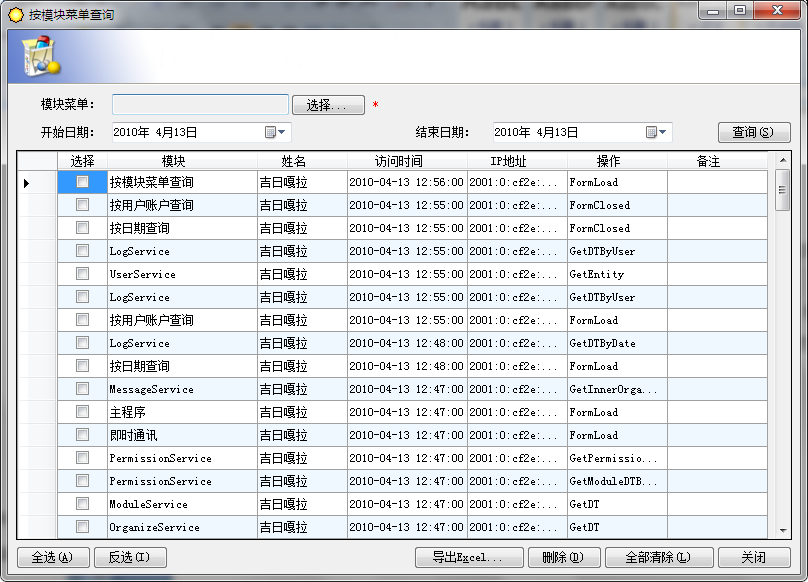
日誌是日記中的一種,多指非個人的,一般是記載每天所做的工作。在計算機科學中,日誌是指伺服器等電腦設備或軟體的運作記錄(Server log)。在電腦設備和軟體出現問題時,日誌是我們在排查問題的一個重要依據。查詢日誌是用戶記錄從客戶端收到所有資料庫或作業系統的查詢,同時也包括了每一個客戶端的連結和斷開連結。
基本介紹
- 中文名:查詢日誌
- 外文名:Query Log
- 學科:計算機科學
- 定義:用戶所有查詢的記錄
- 套用:資料庫、計算機系統
- 作用:便於問題分析、查詢
- 有關術語:日誌
內容簡介,日誌,日誌的作用,日誌記錄類型,日誌的管理,慢查詢日誌,通用查詢日誌,
內容簡介
查詢日誌是用戶記錄從客戶端收到所有資料庫或作業系統的查詢,同時也包括了每一個客戶端的連結和斷開連結。在默認情況下查詢日誌是關閉的。由於查詢日誌會記錄用戶的所有操作,其中還包含增刪查改等信息,在並發操作大的環境下會產生大量的信息從而導致不必要的磁碟IO,會影響系統的性能的。查詢日誌一般分為通用查詢日誌和慢查詢日誌。
查詢日誌檔案主要分為兩種格式: 以記錄為單位的運行日誌檔案和以數據塊為單位的運行日誌檔案。
以記錄為單位的日誌檔案需要登記的內容包括: 各個事務的開始標記,各個事務的結束標記,各個事務的所有更新操作。每個事務開始的標記、結束標記和每個更新操作均作為日誌檔案中的一個日誌記錄。日誌記錄的內容包括: 事務標識、操作的類型(插入、刪除或者修改)、操作對象(記錄內部標識)、更新前數據的舊值、更新後數據的新值。
以數據塊為單位的日誌檔案記錄的內容包括事務標識和被更新的數據塊。由於將更新前的整個塊和更新後的整個塊都放入日誌檔案中,操作的類型和操作對象等信息就不必放入日誌記錄中。
日誌
日誌是日記中的一種,多指非個人的,一般是記載每天所做的工作。在計算機科學中,日誌是指伺服器等電腦設備或軟體的運作記錄(Server log)。
日誌的作用
日誌在資料庫運行管理中,對維護數據的完整性、安全性,以及數據的轉儲備份等方面有著非常重要的作用,具體歸納如下:
(1)恢復個別的事務。使用日誌記錄,前滾未完成的事務所做的修改。
(2)資料庫啟動時恢復所有未完成的事務。當啟動資料庫實例時,它對每個資料庫執行恢復操作。前滾日誌中記錄的、可能尚未寫入數據檔案的每個修改。在事務日誌中找到的每個未完成的事務都將回滾,以確保資料庫的完整性。
(3)將還原的資料庫、檔案、檔案組或頁前滾到故障點。在數據丟失或磁碟故障影響到資料庫檔案後,可以將資料庫還原到故障點。先還原上次完整資料庫備份和上次差異資料庫備份,然後將後續的事務日誌備份序列還原到故障點。當還原每個日誌備份時,資料庫引擎重新套用日誌中記錄的所有修改,以前滾所有事務。當最後的日誌備份還原後,資料庫引擎將使用日誌信息回滾到該點未完成的所有事務。
(4)支持事務複製。日誌讀取器代理程式監視已為事務複製配置的每個資料庫的事務日誌,並將已設複製標記的事務從事務日誌複製到分發資料庫中。
(5)支持備用伺服器解決方案。備用伺服器解決方案、資料庫鏡像和日誌傳送極大地依賴於事務日誌。在日誌傳送方案中,主伺服器將主資料庫的活動事務日誌傳送到一個或多個目標伺服器。每個輔助伺服器將該日誌還原為其本地的輔助資料庫。在資料庫鏡像方案中,資料庫(主體資料庫)的每次更新都在獨立的、完整的資料庫(鏡像資料庫)副本中立即重新生成。主體伺服器實例立即將每個日誌記錄傳送到鏡像伺服器實例,鏡像伺服器實例將傳入的日誌記錄套用於鏡像資料庫,從而將其繼續前滾。
日誌記錄類型
(1)循環日誌記錄:是預設日誌記錄策略。一旦日誌目錄中最後一個主日誌檔案被寫滿了,就會將新的事務寫到第一個日誌檔案中,從而覆蓋現有的日誌數據。這些新事務會繼續依次覆蓋每箇舊日誌檔案。這種日誌記錄方法確保了所有已提交事務的數據一致性,這樣就可以執行應急恢復。
(2) 歸檔日誌記錄:與循環日誌記錄相比,當最後一個日誌檔案寫滿時,歸檔日誌記錄過程會創建一個新的日誌檔案,這樣將來的事務就不會覆蓋現有的日誌檔案。當初始化資料庫時,系統會在活動日誌目錄中分配一定數量和指定大小的主日誌檔案。這個數量由資料庫配置參數控制。當主日誌檔案都寫滿時,就會“根據需要”創建輔助日誌檔案,直到創建了最大數量的輔助日誌檔案為止。一旦達到了這個數量,如果需要附加的日誌空間,就會發出一個錯誤,指出沒有更多的可用日誌檔案,所有資料庫活動停止。分兩種歸檔日誌: 在線上歸檔日誌:它們是駐留在資料庫日誌目錄(“online”)中、普通資料庫活動不再需要的日誌檔案; 脫機歸檔日誌: 它們是已經從資料庫日誌目錄移到脫機存儲位置(如備份伺服器)、普通資料庫活動不需要的日誌檔案。
日誌的管理
日誌的管理分簡單恢復、完整恢復和大容量日誌恢復三種模式:
(1)簡單恢復模式:無日誌備份。自動回收日誌空間以減少空間需求,實際上不再需要管理事務日誌空間。最新備份之後的更改不受保護。在發生災難時,這些更改需要重做。
(2)完整恢復模式:需要日誌備份。數據檔案丟失或損壞不會導致丟失工作。可以恢復到任意時間點(例如,應用程式或用戶錯誤之前)。如果日誌尾部損壞,則必須重做自最新日誌備份之後所做的更改。如果備份在接近特定的時間點完成,則可以恢復到該時間點。
(3)大容量日誌恢復模式:需要日誌備份。它是完整恢復模式的附加模式,允許執行高性能的大容量複製操作。通過大容量日誌記錄大多數大容量操作,減少日誌空間使用量。如果在最新日誌備份後發生日誌損壞或執行大容量日誌記錄操作,則必須重做自該上次備份之後所做的更改。否則不丟失任何工作。可以恢復到任何備份的結尾。不支持時間點恢復。
慢查詢日誌
慢查詢日誌用來記錄執行時間超過long_query_time設定值(默認是10秒)的語句,通過慢查詢日誌,可以查找出執行效率低的語句,以便進行最佳化。
操作步驟
在“RDS實例管理”頁面,選擇指定的集群,在該集群的實例列表中,選擇對應的實例,單擊“管理”,單擊“慢查詢日誌”頁簽。
查看詳細信息。
可查詢如下排序信息。
TOP 10
TOP 20
TOP 50
可根據執行語句類型進行排序。
所有語句類型
SELECT
INSERT
UPDATE
DELETE
CREATE
查看慢查詢日誌:
mysql> use mysql
mysql> selectuser,host,password from user where user="root";
+------+------------------+----------+
| user | host             | password |
+------+------------------+----------+
| root |localhost        |          |
| root |stu18.magedu.com |          |
| root |127.0.0.1        |          |
| root | ::1              |          |
+------+------------------+----------+
4 rows in set (0.08sec)       #查詢時間為0.08
mysql> systemmore /mydata/data/stu18_slow.log          #查詢慢查詢日誌記錄信息
/usr/local/mysql/bin/mysqld,Version: 5.5.33-log (Source distribution). started
with:
Tcp port: 3306  Unix socket: /tmp/mysql.sock
Time                 Id Command    Argument
>>>>>>>>>>>>>>>>部分已省略>>>>>>>>>>>>>>
# Time: 13100723:46:33
# User@Host:root[root] @ localhost []
# Query_time:0.108459  Lock_time: 0.000216 Rows_sent:4  Rows_examined: 6
SETtimestamp=1381160793;
selectuser,host,password from user where user="root";
通用查詢日誌
通用查詢日誌便是其中的一種,通用查詢日誌可以用來記錄用戶的所有操作,包括啟動和關閉MYSQL伺服器、更新、查詢等語句;由於打開通用查詢日誌是記錄用戶的所有操作,在生產環境中這個日誌的量是非常大的,所以一般情況下都是不打開的,myslq默認的該日誌功能也是關閉的,在特殊情況下才進行打開。
通用查詢日誌的系統變數
log_output=[none|file|table|file,table] #通用查詢日誌輸出格式
general_log=[on|off] #是否啟用通用查詢日誌general_log_file[=filename] #通用查詢日誌位置及名字
通用查詢日誌的備份
在Linux或Unix中,你可以通過下面的命令重新命名檔案
並創建一個新檔案:
shell> mv hostname.log hostname-old.log
shell> mysqladmin flush-logs
shell> cp hostname-old.log to-backup-directory
shell> rm hostname-old.log
在Windows中,伺服器打開日誌檔案期間不能重新命名日誌檔案。必須先停止伺服器然後重新命名日誌檔案。然後重啟伺服器來創建新日誌檔案。
通用查詢日誌的使用
a、啟用通用查詢日誌
root@localhost[(none)]> show variables like '%version%';
+-------------------------+------------------------------+
| Variable_name           | Value                        |
+-------------------------+------------------------------+
| innodb_version          | 5.5.39                       |
| protocol_version        | 10                           |
| slave_type_conversions  |                              |
| version                 | 5.5.39-log                   |
| version_comment         | MySQL Community Server (GPL) |
| version_compile_machine | x86_64                       |
| version_compile_os      | Linux                        |
+-------------------------+------------------------------+

--查看系統變數
root@localhost[(none)]> show variables like '%general%';
+------------------+----------------------------+
| Variable_name    | Value                      |
+------------------+----------------------------+
| general_log      | OFF                        |
| general_log_file | /var/lib/mysql/suse11b.log |
+------------------+----------------------------+

--查看當前的通用日誌,顯示無日誌檔案
root@localhost[(none)]> system ls /var/lib/mysql/suse11b.log
ls: cannot access /var/lib/mysql/suse11b.log: No such file or directory
--設定變數general_log以開啟通用查詢日誌
root@localhost[(none)]> set @@global.general_log=1;
Query OK, 0 rows affected (0.00 sec)

--再次查看通用日誌檔案已存在
root@localhost[(none)]> system ls /var/lib/mysql/suse11b.log
/var/lib/mysql/suse11b.log
root@localhost[(none)]> select * from tempdb.tb1;  --執行查詢
+------+------+
| id   | val  |
+------+------+
|    1 | jack |
+------+------+

--查看通用日誌檔案內容
root@localhost[(none)]> system more /var/lib/mysql/suse11b.log
/usr/sbin/mysqld, Version: 5.5.39-log (MySQL Community Server (GPL)). started with:
Tcp port: 3306  Unix socket: /var/lib/mysql/mysql.sock
Time                 Id Command    Argument
141003 16:18:12     4 Query     show variables like '%general%'
141003 16:18:55     4 Query     select * from tempdb.tb1


b、更改通用查詢日誌位置
root@localhost[(none)]> exit
Bye
suse11b:~ # service mysql stop
Shutting down MySQL...                                          done
suse11b:~ # mysqld --general_log_file=/tmp/suse11b.log --user=mysql &
[1] 47009
suse11b:~ # ps -ef|grep mysql|grep -v grep
mysql    47009 44514  1 16:22 pts/0    00:00:00 mysqld --general_log_file=/tmp/suse11b.log --user=mysql
root     47053 44514  0 16:22 pts/0    00:00:00 grep mysql
suse11b:~ # mysql
root@localhost[(none)]> system ls /tmp/suse11b.log
ls: cannot access /tmp/suse11b.log: No such file or directory
root@localhost[(none)]> show variables like '%gener%';
+------------------+------------------+
| Variable_name    | Value            |
+------------------+------------------+
| general_log      | OFF              |
| general_log_file | /tmp/suse11b.log |
+------------------+------------------+

root@localhost[(none)]> set global general_log=on;
Query OK, 0 rows affected (0.01 sec)

--此時從系統變數看出,通用日誌已經到/tmp目錄下
root@localhost[(none)]> show variables like '%gener%';
+------------------+------------------+
| Variable_name    | Value            |
+------------------+------------------+
| general_log      | ON               |
| general_log_file | /tmp/suse11b.log |
+------------------+------------------+

--發布查詢
root@localhost[(none)]> select count(*) from tempdb.tb1;
+----------+
| count(*) |
+----------+
|        1 |
+----------+

--查看通用日誌檔案內容
root@localhost[(none)]> system more /tmp/suse11b.log
mysqld, Version: 5.5.39-log (MySQL Community Server (GPL)). started with:
Tcp port: 3306  Unix socket: /var/lib/mysql/mysql.sock
Time                 Id Command    Argument
141003 16:30:03     1 Query     show variables like '%gener%'
141003 16:30:09     1 Query     select count(*) from tempdb.tb1


c、通用查詢日誌輸出方式
--可以輸出為檔案,表以及不輸出,即TABLE,FILE,NONE
--系統變數log_output
root@localhost[(none)]> show variables like 'log_output';
+---------------+-------+
| Variable_name | Value |
+---------------+-------+
| log_output    | FILE  |
+---------------+-------+

--下面修改為輸出為表方式
root@localhost[(none)]> set global log_output='TABLE';
Query OK, 0 rows affected (0.00 sec)

root@localhost[(none)]> show variables like 'log_output';
+---------------+-------+
| Variable_name | Value |
+---------------+-------+
| log_output    | TABLE |
+---------------+-------+

--發布查詢
root@localhost[(none)]> select * from tempdb.tb1;
+------+------+
| id   | val  |
+------+------+
|    1 | jack |
+------+------+

--Author: Leshami
--Blog  : http://blog.csdn.net/leshami

root@localhost[(none)]> system more /tmp/suse11b.log
mysqld, Version: 5.5.39-log (MySQL Community Server (GPL)). started with:
Tcp port: 3306  Unix socket: /var/lib/mysql/mysql.sock
Time                 Id Command    Argument
141003 16:30:03     1 Query     show variables like '%gener%'
141003 16:30:09     1 Query     select count(*) from tempdb.tb1
141003 16:31:00     1 Query     show variables like 'log_output'
141003 17:00:48     1 Query     set global log_output='TABLE'  #通用查詢日誌輸出到檔案僅僅記錄到全局變數的修改

--mysql.general_log記錄了通用查詢日誌的信息
root@localhost[(none)]> desc mysql.general_log;
+--------------+------------------+------+-----+-------------------+-----------------------------+
| Field        | Type             | Null | Key | Default           | Extra                       |
+--------------+------------------+------+-----+-------------------+-----------------------------+
| event_time   | timestamp        | NO   |     | CURRENT_TIMESTAMP | on update CURRENT_TIMESTAMP |
| user_host    | mediumtext       | NO   |     | NULL              |                             |
| thread_id    | int(11)          | NO   |     | NULL              |                             |
| server_id    | int(10) unsigned | NO   |     | NULL              |                             |
| command_type | varchar(64)      | NO   |     | NULL              |                             |
| argument     | mediumtext       | NO   |     | NULL              |                             |
+--------------+------------------+------+-----+-------------------+-----------------------------+

--從通用查詢日誌表里查看通用查詢日誌的內容
root@localhost[(none)]> select thread_id,command_type,argument from mysql.general_log;
+-----------+--------------+---------------------------------------------------------------+
| thread_id | command_type | argument                                                      |
+-----------+--------------+---------------------------------------------------------------+
|         1 | Query        | show variables like 'log_output'                              |
|         1 | Query        | select * from tempdb.tb1                                      |
|         1 | Query        | desc mysql.general_log                                        |
|         1 | Query        | select thread_id,command_type,argument from mysql.general_log |
+-----------+--------------+---------------------------------------------------------------+

root@localhost[(none)]> show variables like 'log_output';
+---------------+-------+
| Variable_name | Value |
+---------------+-------+
| log_output    | TABLE |
+---------------+-------+

--使用FILE,TABLE 2者混合輸出通用日誌
root@localhost[(none)]> set global log_output='file,table';
Query OK, 0 rows affected (0.00 sec)

root@localhost[(none)]> select @@global.log_output;
+---------------------+
| @@global.log_output |
+---------------------+
| FILE,TABLE          |
+---------------------+

root@localhost[(none)]> insert into tempdb.tb1 values(2,'robinson');
Query OK, 1 row affected (0.06 sec)

root@localhost[(none)]> commit;
Query OK, 0 rows affected (0.01 sec)

--驗證結果,表和檔案裡邊存在通用的日誌記錄
root@localhost[(none)]> system tail /tmp/suse11b.log|grep robinson
141003 17:41:54     2 Query     insert into tempdb.tb1 values(2,'robinson')
root@localhost[(none)]> select thread_id,command_type,argument from mysql.general_log
    -> where argument like '%robinson%';
+-----------+--------------+------------------------------------------------------------------------+
| thread_id | command_type | argument                                                               |
+-----------+--------------+------------------------------------------------------------------------+
|         2 | Query        | insert into tempdb.tb1 values(2,'robinson')                            |
|         2 | Query        | select thread_id,command_type,argument from mysql.general_log          |
|           |              |    where argument like ''robinson''                                    |
+-----------+--------------+------------------------------------------------------------------------+


d、關閉通用查詢日誌
--可以通過設定系統變數general_log來關閉通用查詢日誌,此時日誌輸出設定為FILE,TABLE
root@localhost[(none)]> show variables like 'log_output';
+---------------+------------+
| Variable_name | Value      |
+---------------+------------+
| log_output    | FILE,TABLE |
+---------------+------------+

root@localhost[(none)]> set global general_log=off;
Query OK, 0 rows affected (0.01 sec)

root@localhost[(none)]> show variables like '%gener%';
+------------------+------------------+
| Variable_name    | Value            |
+------------------+------------------+
| general_log      | OFF              |
| general_log_file | /tmp/suse11b.log |
+------------------+------------------+

root@localhost[(none)]> delete from tempdb.tb1 where id=2;
Query OK, 1 row affected (0.12 sec)

root@localhost[(none)]> commit;
Query OK, 0 rows affected (0.00 sec)

root@localhost[(none)]> system tail -n 1 /tmp/suse11b.log
141003 17:45:13     2 Query     set global general_log=off

root@localhost[(none)]> select thread_id,command_type,argument from mysql.general_log
    -> where argument like '%delete%';
Empty set (0.00 sec)

--從上面的演示可知,儘管我們設定了log_output為FILE,TABLE,但general_log為OFF,通用日誌無任何記錄產生

root@localhost[(none)]> set global log_output=none;
Query OK, 0 rows affected (0.00 sec)

root@localhost[(none)]> set global general_log=1;
Query OK, 0 rows affected (0.00 sec)

root@localhost[(none)]> truncate table tempdb.tb1;
Query OK, 0 rows affected (0.01 sec)

root@localhost[(none)]> system tail -n 1 /tmp/suse11b.log
Time                 Id Command    Argument
